Match Masters stickers unlock some of the best rewards in the game. Each finished album page pays out a prize, and a full album adds another, usually bigger one: big coin prizes, SE and Legendary boosters, Super Spins, Sticker Tokens, and even outfits you can only win through albums. The first pages fill up fast. What keeps an album open is the last few gaps, and those are usually Gold, Diamond, or Seasonal stickers.
That’s where most players get stuck: random packs mostly give duplicates by then, and Gold, Diamond, and Seasonal stickers can only be traded or requested on special trading days. Below, you’ll see where to target them, how trading works step by step, and when a Sticker Token is worth spending.
For the latest free sticker links, check our Match Masters free gifts page, and to get stickers from teammates, see our Match Masters Teams guide.
GUIDE NAVIGATION
Match Masters Stickers Guide
Jump directly to the section you need.
12 sections
Match Masters Stickers: Quick Guide
- Know the odds: A random sticker is Gold only 5% of the time and Diamond only 1%, so random packs rarely close an album.
- Sending slots are limited: You get 2 White slots and 1 Silver slot a day. Seasonal, Gold, and Diamond stickers get 1 slot each, only on special trading days.
- Duplicates are never wasted: Each one adds Duplicates Bar points, from 1 for a White sticker to 50 for a Diamond sticker.
- Ask instead of waiting: TRADE → REQUEST gives you one link for every sticker you need, and ASK TEAM asks your teammates. Nobody can send you a sticker you already have.
- Save Sticker Tokens for the hardest gaps: a Diamond sticker you can’t find, or a Seasonal sticker before the season ends.
- Finish what you start: A new album opens only when you don’t have too many open, and the Seasonal album closes when the season ends.
How Match Masters Stickers and Albums Work
Match Masters stickers are collectibles that fill themed albums. You get them from packs, rewards, trades, and requests, and each one has its own spot on an album page. Complete a page to win its page prize, then finish every page for the album prize.
All your albums are on the COLLECTION screen, which you open from the Albums tab. The Seasonal Albums row at the top shows the current Seasonal album with its countdown and progress, next to past Seasonal albums. Below it, every regular album shows how many of its stickers you have, for example 17/20, or a Complete label once it’s done.
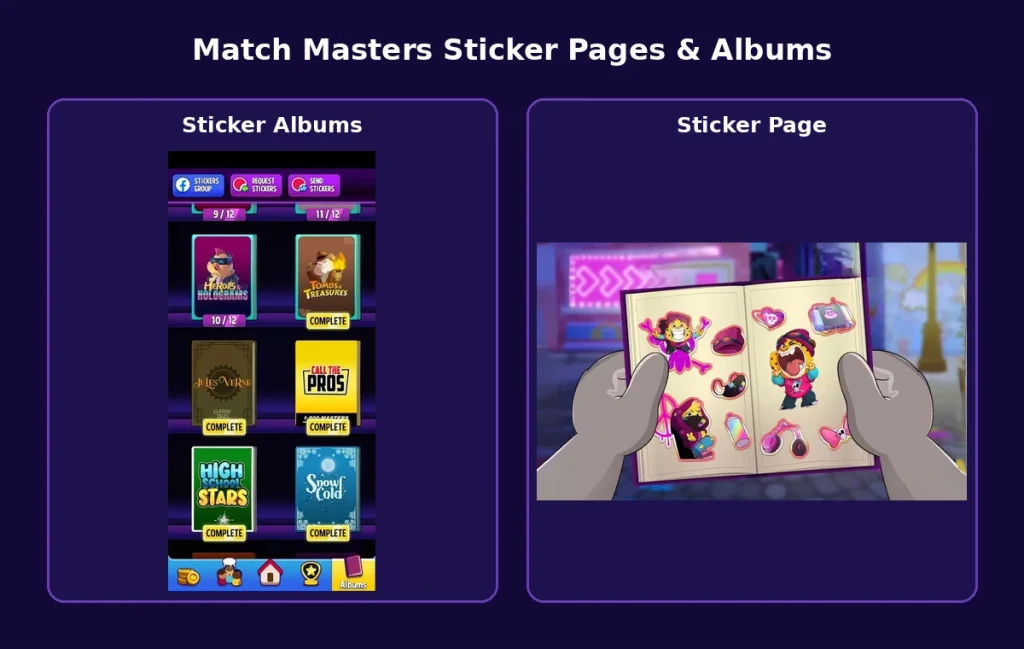
Each album is split into pages, and the game guides you through filling them. When you win a sticker, its album gets a red number showing how many new stickers are waiting.
Tap the album, and it opens on the right page, where you place the sticker on its outline. If several stickers are waiting, the page nearer the front opens first, and you can’t move to another page until the stickers waiting on it are placed.
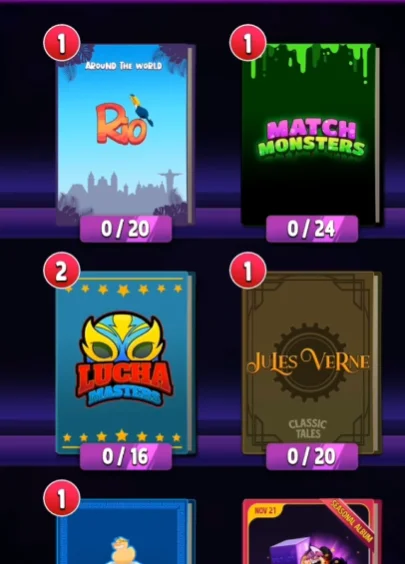
Match Masters has more than 180 regular albums, not counting the Seasonal and special albums. You can have several albums open at once, including the Seasonal album, but a new album opens only when you don’t already have too many open. Finishing an album is what makes room for the next one.
If you have no regular album left open and no new one appears, you may have completed every album currently in the game. New ones are announced in the in-game News.
Sticker Tiers and Drop Chances
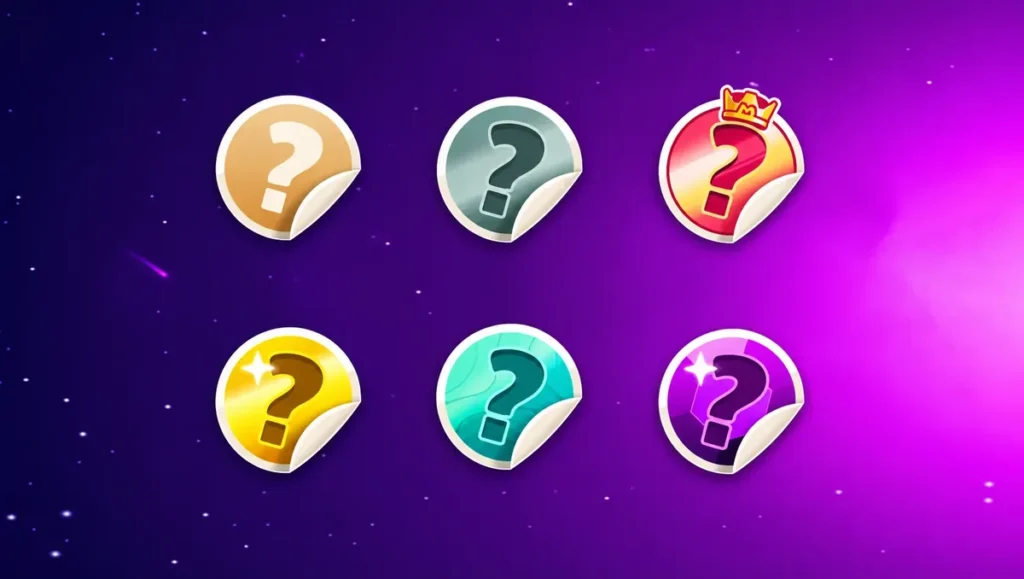
Stickers come in tiers: White, Silver, Gold, and Diamond, plus Seasonal stickers and the stickers of special albums. You can’t choose which sticker you get from a pack or a reward, and the odds lean heavily toward the low tiers. According to the official Match Masters probability page, a random sticker is White 79% of the time, Silver 15%, Gold 5%, and Diamond only 1%.
The border color shows a sticker’s type, even on an empty outline: white for White, gray for Silver, gold for Gold, purple for Diamond, pinkish red for Seasonal, and cyan for Social Scenes, Solo, and Adventure stickers.
Match Masters Album Rewards
Every album pays out twice. Each finished page gives its page prize, usually one reward and sometimes two. When every page is done, you also get the album prize, which is usually bigger and often combines several items, though some albums give a single reward.
Depending on the album, these prizes can include:
- Coins: from smaller page prizes up to big album prizes.
- Boosters and perks: boosters up to SE and Legendary (lower-tier ones are common in the first albums), Booster Shields, and perks.
- Super Spins and Piñatas: each one opens into more prizes.
- Sticker Tokens: the wildcard that turns into any sticker you are missing.
- Cosmetics: outfits, Showoffs that change your winning animation, and Emotes for the in-match chat. Some outfits can only be won through albums, and you can switch them anytime in the Wardrobe.
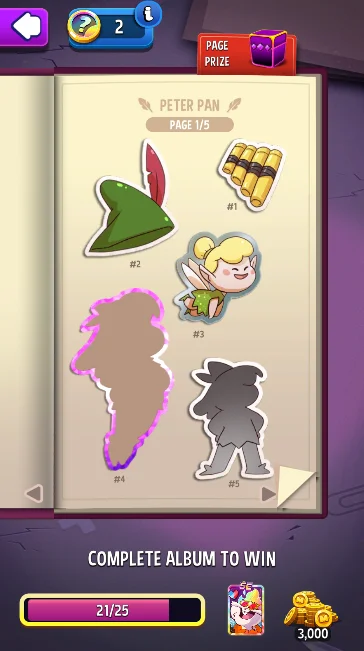
You can see both on the album page: the PAGE PRIZE in the top-right corner, and the album prizes next to the COMPLETE ALBUM TO WIN bar at the bottom. Prizes depend on the album and its type, so check them before you decide where to trade or spend a Sticker Token.
How to Get Stickers in Match Masters
A sticker’s type decides where you can get it:
| Sticker type | Main sources |
|---|---|
| White and Silver | Almost every random source: gift links, Lucky Spin, Daily Rewards, events, and store packs |
| Gold | Random sources (5% chance), Daily Rewards, Piñatas, and store offers |
| Diamond | Random sources (1% chance), Missing Diamond Sticker rewards from Super Spins and events, Piñatas, and store offers |
| Seasonal (from Grand Master) | Trophy Road, Lucky Spin, Main Events, Solos, Rumbles, and store offers |
| Special album stickers | Their own part of the game: Adventure Mode, Solos, social links, team events, or the Premium Pass |
Most of an album can be filled without spending anything. These sources are free:
- Free gift links: Some links shared on the game’s social channels give stickers, especially for the Social Scenes album. Not every link includes one, so we keep the current free sticker links in one place.
- Lucky Spin: The free spin you can claim once every 24 hours in the store, unlocked at 175 trophies. Its prizes change as you progress: stickers join the pool from 1,000 trophies, and from the Grand Master League up it can also give a Seasonal sticker.
- Daily Rewards: Tap the menu button in the top-right corner of the home screen and choose DAILY REWARDS. It opens the daily reward calendar in the Masters Market, where some days give random stickers, sometimes even a Gold sticker.
- Trophy Road: Some of its steps give sticker prizes, including Missing Stickers, and Seasonal stickers once you reach Grand Master.
- Main Events: They unlock at 500 trophies. Every match earns the event’s item, more when you win, and milestones on the prize path can give stickers, even Seasonal ones. In some Main Events, inviting friends or helping your team adds points too.
- Other events: Solos, Rumbles, Tournaments, and Adventures can give stickers along their prize paths, sometimes with the Missing Sticker tag. Check the event’s prize screen before you play.
- Your team: Teammates can send you stickers you ask for, and team events such as Sticker Mania give stickers too, as explained in the team section below.
- Trading: Your duplicates can be traded for stickers you need, as explained in the trading section below.
- The Arcade: From the Legends League (30,000 trophies), you play Arcade mini-games with Tokens (not the same as Sticker Tokens) and spend the Credits you win in the Prize Center, which also sells stickers and Sticker Tokens. Our Match Masters Arcade guide explains how to earn more Tokens and Credits.
Stickers also come from these sources:
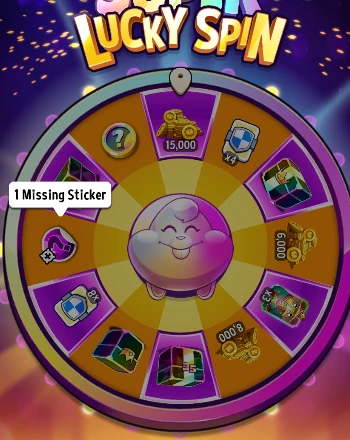
- Super Spin: The upgraded version of the Lucky Spin, with bigger prizes. You win Super Spins as prizes, including some album prizes, or buy them, then open the Lucky Spin and switch to the Super Spin. From the Master League up, its pool can include a Missing Diamond Sticker, and from the Legends League up, a Sticker Token.
- Piñatas: Besides their other prizes, some Piñatas include a sticker reward that can be a Missing Silver, Gold, or Diamond sticker, and occasionally a Sticker Token.
Random sources are great early in an album. Once you have most of an album’s stickers, they mostly give duplicates, and that’s when trading, team requests, and Sticker Tokens matter more.
Buying Stickers With Coins
You don’t need real money for stickers: the store has a STICKERS section where you can buy stickers with coins. Its offers change from day to day: random sticker packs of different sizes, and Silver, Gold, Diamond, or Seasonal stickers, sold one at a time or in a pack.
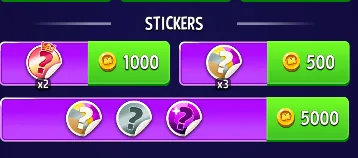
Most of these stickers are random, so they can be duplicates. Random packs use the normal odds, so each sticker in them has only a 1% chance of being a Diamond. Some offers give Missing Stickers instead, which are new unless you already have every sticker of that tier.
Packs pay off when an album still has many gaps, especially White stickers, because most of what you get will be new. With only a few stickers missing, a random pack will probably give duplicates. They still add Duplicates Bar points, but trading and requests are the better way to close the album.
Diamond stickers are sometimes sold on their own and sometimes inside a pack. Even a single Diamond sticker offer is random, so it can be one you already have. It’s most useful when several of your albums are missing Diamond stickers, because each one you buy then has a better chance of being new.
The Masters Market, the Match Masters web store you reach through DAILY REWARDS, works the same way. Its STICKERS section also sells stickers for your in-game coins, and its offers can differ from the ones in the game.
From the Legends League, the Arcade Prize Center is another place to buy stickers. It sells random sticker packs and Sticker Tokens for Credits instead of coins, and its Limited Time Deals sometimes bundle stickers with perks or boosters.
How to Get Gold and Diamond Stickers
Gold and Diamond stickers are usually what keeps an album open. With only a 5% and 1% chance from a random sticker, waiting for one to drop is slow, so focus on the sources that target them:
- Missing Diamond Sticker rewards: Look for them in Super Spin pools from the Master League up and in event prize paths. They give a Diamond sticker you don’t have yet, unless you already have every Diamond sticker.
- Piñatas: Some Piñatas have a sticker reward that can land a Gold or Diamond sticker.
- Daily Rewards: The daily reward calendar sometimes includes a Gold sticker.
- Store offers: Gold and Diamond stickers are sometimes sold for coins, on their own or in a pack. They are random, so they can still be duplicates.
- Special trading days: These are the only days you can trade for or request Gold and Diamond stickers. See how trading days work.
- Sticker Token: It’s the sure way to get one specific Gold or Diamond sticker when nothing else works.
Missing a Gold, Diamond, or Seasonal Sticker While Trading Is Closed?
Without a Sticker Token, there is no instant way to get one specific Gold, Diamond, or Seasonal sticker on a normal day: you can’t trade for it or even request it until its trading day. What you can do in the meantime:
- Wait for the trading day: Each one opens certain tiers, so check that the pop-up includes yours, then trade for the sticker or request it.
- Collect Missing Sticker rewards: Super Spins, some Piñatas, and events can give them. They land in a random open album, so they may not fill this exact gap. They only give a duplicate if you already have every sticker of that tier.
- Check the store: Gold and Diamond offers for coins pay off only when several of your albums are missing that tier, as explained in buying stickers with coins.
- For a Seasonal sticker, watch the clock: Seasonal stickers keep coming from the Trophy Road, the Lucky Spin, Main Events, Solos, Rumbles, and store offers, but the album closes when the season ends, so don’t leave the gap until the last days.
If you already have a Sticker Token, this is exactly the kind of gap it’s for.
How to Trade Stickers in Match Masters
Tap TRADE in the top-left corner of the COLLECTION screen to open the trade menu:
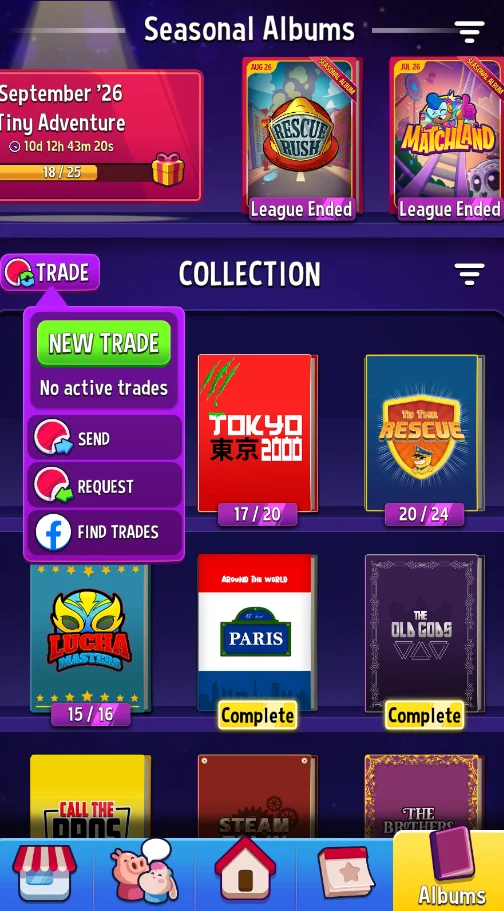
- NEW TRADE: Offer one of your stickers in exchange for one from another player.
- SEND: Give a sticker you can spare to another player.
- REQUEST: Copy one general request link for all the stickers you still need.
- FIND TRADES: Open the official Match Masters Facebook group or a regional group, where players post the stickers they need and offer.
How to Make a Trade With a Trade Link
- Tap TRADE, then NEW TRADE.
- Choose the sticker you want to send and tap Create Trade Link.
- Copy the link or tap Share My Link to send it to your trade partner.
- Your partner opens the link and has 30 minutes to choose the sticker they are sending back.
- Check their offer and approve it to complete the trade.
While the trade is open, your sticker and the trade slot are locked. If the trade isn’t completed within 30 minutes, both come back to you.
Daily Sticker Trade Limits
| Sticker type | Trade slots |
|---|---|
| White | 2 sending slots per day |
| Silver | 1 sending slot per day |
| Seasonal | 1 sending slot, special trading days only |
| Gold | 1 sending slot, special trading days only |
| Diamond | 1 sending slot, special trading days only |
| Adventure, Solo, and other special album stickers | Can’t be traded |
These slots count for everything you send, not just trades: stickers you give with SEND or with Send Stickers in the team chat use the same daily slots. A message such as WHITE SLOT ALREADY USED or SILVER SLOT ALREADY USED means you have used that slot for the day. With an active Premium Pass, you also get one extra trading slot.
When you send stickers to a player, the SELECT STICKERS screen lists only the duplicates that player can still receive, and the Rarity Filters at the top narrow the list to one tier.
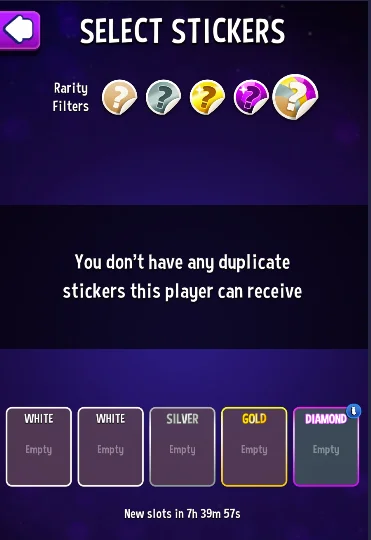
Your sending slots are at the bottom, with a New slots in countdown until they refresh. If the screen says you don’t have any duplicate stickers this player can receive, none of your spares are stickers they are missing.
How Special Trading Days Work
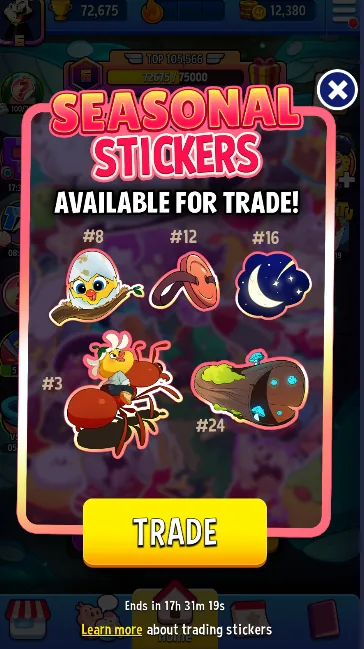
Special trading days for Seasonal, Gold, and Diamond stickers are announced when they start: with a push notification, a full-screen pop-up when you open the game, and posts on the Match Masters social channels and Discord. The pop-up also shows how long the trading day lasts, so keep push notifications on to catch it early.
On Seasonal trading days, not every Seasonal sticker is always included. Sometimes only a few can be traded, and the pop-up lists them by number, so check it before you look for a trade partner.
Trading Safely
A Trade Link is the safer way to trade: you only give your sticker when you approve the other player’s offer. Sending a sticker with SEND is a gift, so the other player doesn’t have to send anything back.
Trading with strangers: When you trade with players from Facebook groups, Discord, or Reddit, always use a Trade Link instead of sending first. If someone in the official Facebook trading group scams you, report them to the group moderators.
How to Request Stickers in Match Masters
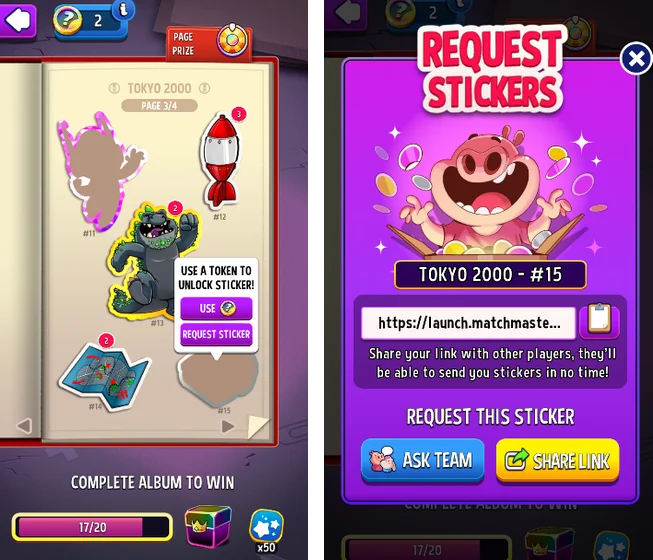
Other players can also send you stickers without a trade. To ask for them, you have two kinds of request links:
- One specific sticker: Open the album, tap the missing sticker, and choose REQUEST STICKER. In the Request Stickers window, SHARE LINK copies a link for that exact sticker, and ASK TEAM posts the request in your team chat.
- Every sticker you need: Tap TRADE, then REQUEST, on the COLLECTION screen. This copies one general link that covers all your missing stickers.
Whoever opens your link can send you any of their spares you’re missing, using their own daily sending slots. Nobody can send you a sticker you already have, so everything you get this way is new.
Requests follow the same limits as trades: Seasonal, Gold, and Diamond stickers can only be requested on their trading day.
In the official Match Masters Facebook group, the general link is the easiest way to ask: post it once, and anyone with a spare you need can send it. For one hard sticker, share its own link instead. You can also name the album and the number printed under the sticker on the album page, such as #9 in Peter Pan, but a link is much easier for other players to use.
Getting Stickers From Your Team
An active team makes requests much faster. Your ASK TEAM request appears in the team chat as a card with the sticker’s picture, number, and album.
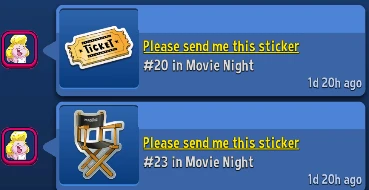
Return the favor with Send Stickers in the team chat, which lists teammates who need one of your spares.
In a good team, helping others often pays back: teammates may send you stickers you need, and when you start a new album, some send their spares without being asked. It isn’t guaranteed, and it happens less in a quiet team.
Team events add more. In Sticker Mania, the team collects stars together, and when the event ends, every member gets the same sticker: the more stars the team collects, the rarer the sticker. Other team events fill the Stick-Together album, and the daily Team Request can also give stickers once enough teammates help. Our Match Masters Teams guide explains how to find an active team and how requests work.
Receiving Stickers and Sending Some Back
Whenever another player sends you stickers, whether a teammate, a friend, or someone who used your request link, an INCOMING STICKERS pop-up tells you who sent them. Tap COLLECT to add them to your albums.
The YOUR STICKERS screen then shows what you received, and its SEND STICKERS TO button lets you send stickers back to that same player straight away, as long as you have spares they need and a free sending slot.
Duplicate Stickers and the Duplicates Bar
A duplicate is never wasted. Every sticker you already own turns into points on the Duplicates Bar. When you collect enough points to fill the bar, you get its prize, and a new bar starts with a new point target.
Each new bar needs more points than the one before. The first bars fill quickly, while later ones can take a few hundred points. The prize changes with each bar, and later bars can give an SE or Legendary booster, a Sticker Token, or a Booster Shield. Each duplicate adds points based on its sticker type:
| Sticker type | Duplicates Bar points |
|---|---|
| White | 1 |
| Silver | 3 |
| Seasonal | 5 |
| Gold | 10 |
| Adventure | 30 |
| Life of Luxury | 30 |
| Diamond | 50 |
Eligible duplicates can also be traded, within your daily sending slots. Some albums don’t give duplicates at all until they are complete: Adventure albums, Solo albums, Social Scenes, and the Stick-Together team album. Every sticker you earn for them is new until the album is finished.
Missing Stickers and Sticker Tokens
What Is a Missing Sticker?
Missing Sticker isn’t a sticker type. It’s a tag that comes on a sticker reward of a certain tier, such as a Missing Silver Sticker or a Missing Diamond Sticker. A reward with this tag always gives you a sticker of that tier you don’t have yet, unless you have already collected every sticker in the tier.
You get Missing Stickers from events, the Trophy Road, social media giveaways, the end of an Adventure, and some Super Spin and Piñata prizes. Keep in mind that each one gives you a missing sticker from the tier, not the specific one you pick, and it goes to a random album among the ones you have open.
What Is a Sticker Token?

A Sticker Token is a wildcard: it turns into any sticker you are missing, including old Seasonal stickers and Adventure stickers. To use one, open the album, tap the missing sticker, and choose USE: the sticker appears right away. Your Sticker Token count is shown in the top-left corner of the album page.
Sticker Tokens are among the most valuable items in the game, and there is no easy, steady way to get them. They appear as prizes in some events and team events, as album prizes, on later Duplicates Bars, in Super Spin pools from the Legends League up, and in some Piñatas. You can also buy them in the Arcade Prize Center with the Credits you win there, though they cost a lot of Credits.
Save it for the hardest gaps: Because a Sticker Token lets you choose exactly the sticker you need, use it on the last sticker of an album, a Diamond sticker you can’t find, a Seasonal sticker when the season is about to end, or the last gap in an old Seasonal album. Spending it on a White sticker you could trade for tomorrow wastes most of its value, so try a trade or a request first.
Special Sticker Albums in Match Masters
Besides the regular albums, several albums are tied to a specific part of the game. Adventure, Solo, Social Scenes, Stick-Together, and Life of Luxury albums can be reset after you complete them, so you can collect their stickers and prizes again. After a reset, the album page shows how many times you have finished it, for example COMPLETED 2 TIMES.
Reset first: Until you reset a completed album, new stickers for it come in as duplicates.
Seasonal Album
The Seasonal album unlocks in the Grand Master League (10,000 trophies). You get a new one every season, and it has to be finished before the season ends. Seasonal stickers come from the Trophy Road, the daily Lucky Spin, store offers, and events such as Main Events, Solos, and Rumbles. They can be traded on special trading days.
If you finish the album early, any Seasonal stickers you earn for the rest of that season are duplicates. Each one adds 5 points to your Duplicates Bar, so they still count for something. A new album with fresh stickers opens with the next season.
Past Seasonal albums stay in the Seasonal Albums row, marked League Ended. If one of them was left a sticker or two short, a Sticker Token can still finish it. Sticker Tokens are valuable, though, so spend one only when that album’s prize is worth it.
Adventure Albums
Adventure albums unlock in the Master League, together with Adventure Mode. You earn Adventure stickers by winning Adventure Mode, and each adventure has its own album: Flames & Fortune, Heroes & Holograms, Seadogs & Scallywags, and Tombs & Treasures. You get no duplicates until the album is complete, and it can be reset after that.
Solo Albums
Solo albums are filled by winning Solo events. Their stickers are the cyan ones from Cosmic Rush, Mutation Lab, Perfect Heist, Score Rally, and Speed Solo. These events can also give regular and Seasonal stickers. Solo albums give no duplicates until complete and can be reset. For how these events play, see our Match Masters game modes guide.
Social Scenes
Social Scenes is open to everyone. Its stickers come from links shared on the Match Masters social media channels, and some of these links also lead to special in-game events. We collect the current links on our free gifts page, so you don’t have to follow every channel. The album can be reset after it’s complete.
Stick-Together (Team Album)
Stick-Together is for team members: its stickers can only be earned in team events such as Star Heroes and Team Solo. Until the album is complete, every sticker you get is one you’re missing.
Once the album is complete, tap Reset Album before you claim the next batch of team stickers. If you claim them without resetting, they can come in as duplicates. Resetting clears the album so you can collect it again from the start, and you don’t lose anything for duplicates you had before: their Duplicates Bar points were already added when you received them.
Life of Luxury
Life of Luxury is the Premium album and needs an active Match Masters Premium Pass. Its stickers come from Pass-only Solos, Rumbles, and Daily Modes, and each duplicate grants 30 Duplicates Bar points, the same as Adventure duplicates. Like the albums above, it can be reset once complete.
All Stars
The All Stars album is only for players who reach Rank 10 in Ultimate Legends. Reaching that rank gives stickers that unlock the album, and special Solo events marked All Star, open only to those players, give more of its stickers. Powered-up boosters can’t be used in All Star Solos.
How to Complete Sticker Albums Faster
The fastest approach depends on how many stickers you still need:
- Many stickers missing: Just play. The Trophy Road, events, gift links, and the daily Lucky Spin fill a new album quickly, and this is when sticker packs for coins pay off most.
- A few missing: Start trading your duplicates, ask your team, and look for Missing Sticker rewards in events.
- One or two missing: Stop counting on random packs. Gold, Diamond, and Seasonal gaps can only be traded or requested on special trading days. Try the targeted options that are open to you, in this order: trade → Missing Sticker rewards → ASK TEAM → community trading groups → Sticker Token.
Common Sticker Mistakes
- Leaving almost-complete albums open: A new album opens only when you don’t have too many open, so finish the one closest to completion first.
- Buying random packs for the last few stickers: They mostly give duplicates by then. Trade or request instead.
- Waiting until the end of the season: The Seasonal album closes with the season.
- Spending Sticker Tokens on easy stickers: Keep them for the hardest gaps, such as Diamond or Seasonal stickers.
- Giving stickers away before a trade: SEND and Send Stickers in the team chat use the same daily slots as trades.
- Claiming team stickers before resetting Stick-Together: On a completed album, they can come in as duplicates.
- Sending first to strangers: Always use a Trade Link.
Match Masters Stickers FAQ
What do you get for completing an album in Match Masters?
Every finished page gives its page prize, and finishing all pages adds the album prize, which is usually bigger. Depending on the album and its type, it can include big coin prizes, perks, boosters up to SE and Legendary, Super Spins, Piñatas, Booster Shields, Sticker Tokens, outfits, Showoffs, or Emotes. Each album shows its prizes on the album page.
How do you get a specific sticker in Match Masters?
Trade for it with a Trade Link, request it with ASK TEAM or SHARE LINK, or use a Sticker Token. A Sticker Token is the only item that lets you pick the exact sticker yourself. Seasonal, Gold, and Diamond stickers can only be traded or requested on special trading days.
How do you get Diamond stickers in Match Masters?
A random sticker is a Diamond sticker only 1% of the time, so target them instead: Missing Diamond Sticker rewards from Super Spins and events, some Piñatas, Diamond sticker offers for coins in the store, and special trading days. A Sticker Token is the sure way to get one specific Diamond sticker.
Can you buy stickers with coins in Match Masters?
Yes. The store has a STICKERS section where you pay with coins. Its offers change from day to day and can include random sticker packs or Silver, Gold, Diamond, and Seasonal stickers. Most are random and can be duplicates, so buying pays off most when an album still has many gaps.
Why can’t I trade or request Gold or Diamond stickers?
Gold, Diamond, and Seasonal stickers can only be traded or requested on special trading days. On normal days, only White and Silver slots are available.
When is the next special trading day in Match Masters?
There’s no fixed schedule, and trading days aren’t announced in advance. When one starts, you get a push notification and a full-screen pop-up in the game, and it’s posted on the Match Masters social channels and Discord. The pop-up also shows how long the trading day lasts.
How many sticker albums are in Match Masters?
There are more than 180 regular albums, plus the Seasonal album and special albums such as Adventure, Solo, Social Scenes, and Stick-Together. New albums are still being added and are announced in the in-game News.
Why isn’t a new album opening?
A new album opens only when you don’t already have too many open, so finish the album closest to completion first. If you have no regular album left open and no new one appears, you may have completed everything currently available. New ones are announced in the in-game News.
What happens to duplicate stickers?
They turn into Duplicates Bar points, from 1 point for a White sticker up to 50 for a Diamond sticker. A full bar gives you a prize, and eligible duplicates can also be traded.
What happens to Seasonal stickers after I complete the Seasonal album?
For the rest of that season, they come in as duplicates and add 5 points each to your Duplicates Bar. A new Seasonal album opens with the next season.
Can Sticker Tokens be used for old Seasonal stickers?
Yes. A Sticker Token turns into any missing sticker, including old Seasonal and Adventure stickers, so it can finish a past Seasonal album marked League Ended.
Can you get Sticker Tokens for free?
Yes. Sticker Tokens come as prizes in some events and team events, as album prizes, from the Duplicates Bar, and from Super Spins (Legends League and up) and some Piñatas. You can also buy them in the Arcade Prize Center with Credits, but there is no steady daily source, so save them for the hardest gaps.
Album prizes can include boosters and perks. Our Match Masters boosters guide and perks guide show how to make the most of them.